
Help4 Dependencies, Updates and Release Diagnostics
Before changing settings
Confirm the site, user state, current version, and recovery path.
Open the exact site and feature named in the request, record its current behavior, and keep a bounded recovery option. Change one setting group at a time so the verification can identify what actually changed.
Target
Record the domain, URL or admin screen, user role, viewport, and specific outcome before changing configuration.
Current state
Capture the relevant version, enabled module, existing value, and a fresh public or runtime check.
Recovery
Keep the previous immutable package, WordPress revision, export, or narrow data snapshot needed for this feature.
Privacy
Keep credentials, private customer data, payment secrets, nonces, and protected files out of screenshots and support reports.
Visual orientation
Match the screen before following the steps.
Open each image at full size. The numbered notes explain what the screen controls and what to confirm before changing customer content.
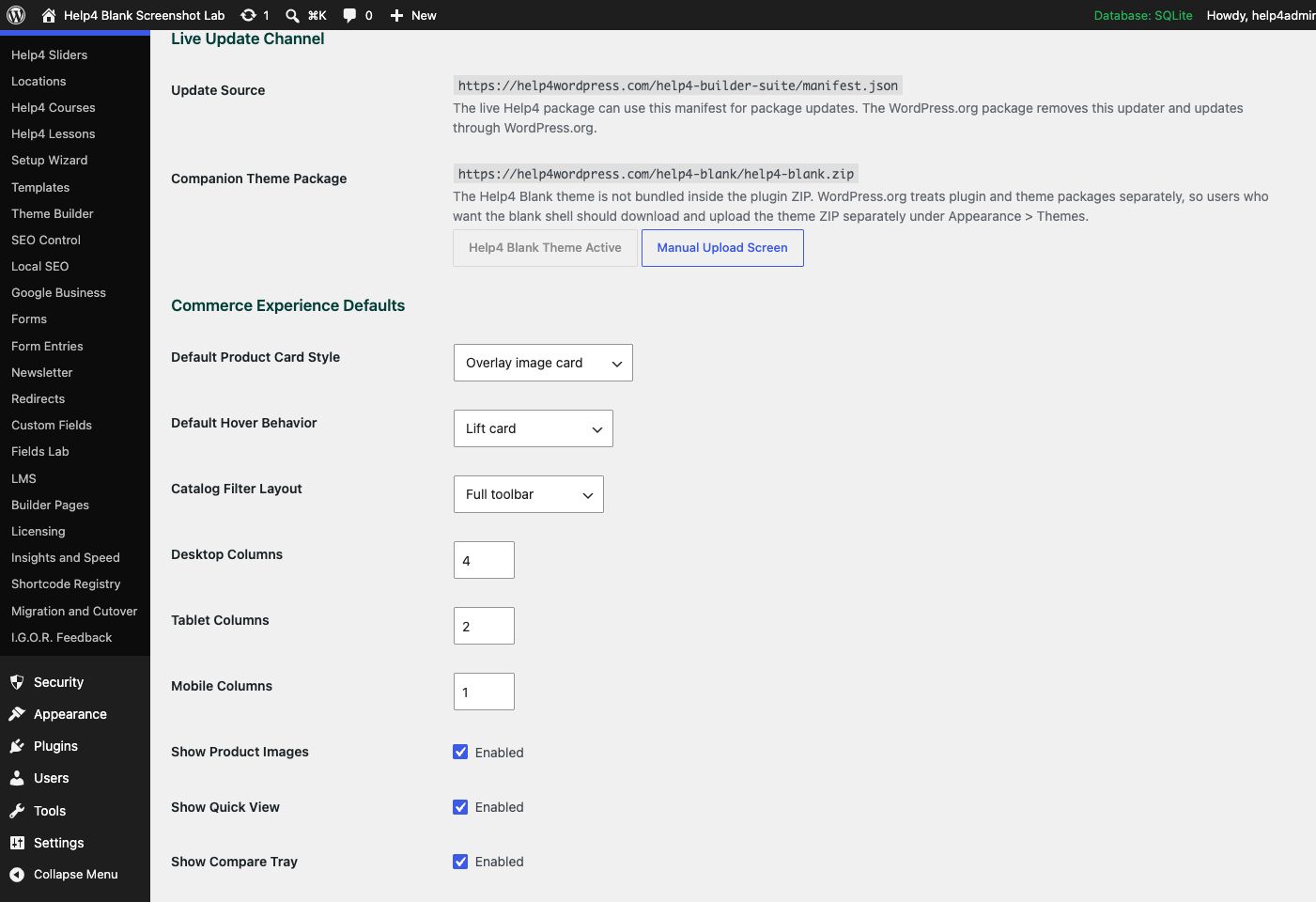
Screen 1
Updates
Confirm the installed version, free update status, manifest URLs, beta or stable channel behavior, and package checks.
Confirm: the page title, selected item, plugin version, and intended responsive view match the task.
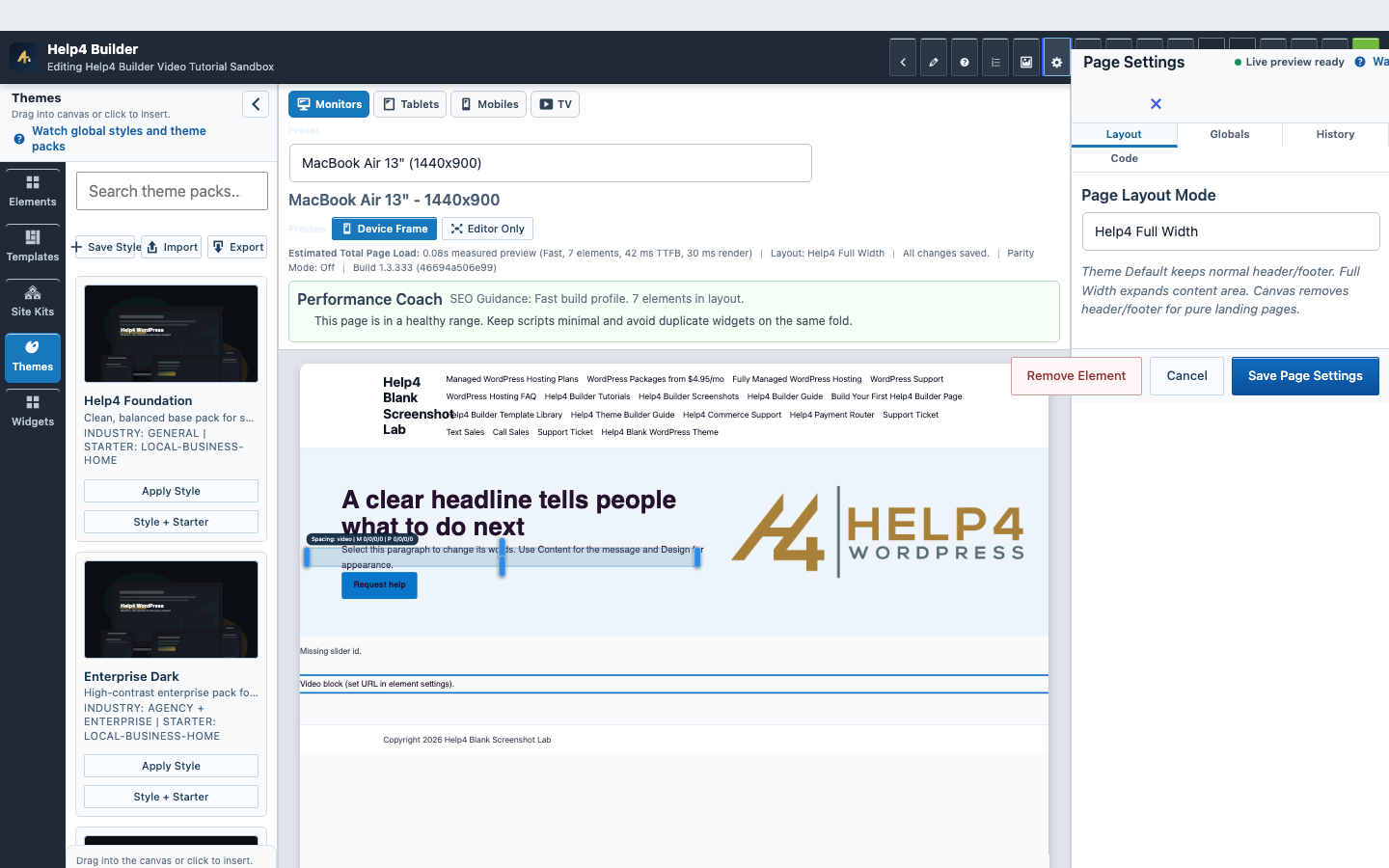
Screen 2
Page Settings and recovery
Confirm page-level layout, history, preview, and recovery controls before a larger edit.
Confirm: the page title, selected item, plugin version, and intended responsive view match the task.
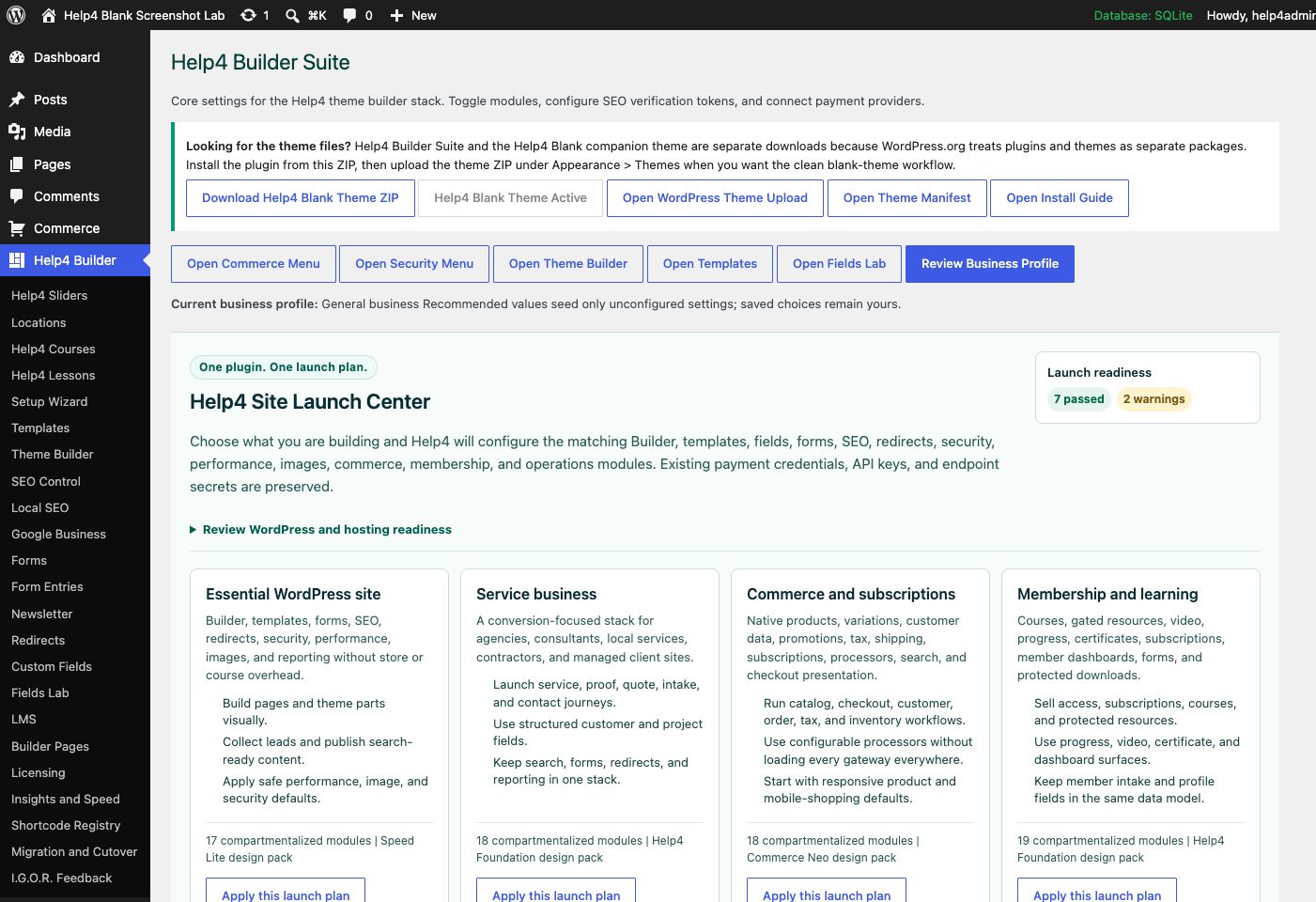
Screen 3
Settings and launch center
Choose a launch plan, confirm modules, download Help4 Blank, review readiness, and keep the site configuration in one place.
Confirm: the page title, selected item, plugin version, and intended responsive view match the task.
Watch the real workflow
Watch the clicks before making the change.
Use the narrated walkthrough first, then follow the written steps and verification checks on this page.
Lesson 35
Modules, Dependencies, and Update Diagnostics
Enable only the features a site needs, verify dependency health, and prove the identity and behavior of every update.
Read the complete transcript
- Choose Active Modules
Open Builder settings and review the feature modules. Enable the Builder, commerce, SEO, forms, learning, operations, or other compartments the site actually uses. Disabling an unused module can reduce administration noise and asset work, but never disable a module until you know which pages, shortcodes, templates, and data depend on it.
- Review Dependency State
Confirm WordPress, PHP, database, active theme, companion theme, addon contracts, and required extensions meet the release requirements. A dependency warning should identify the affected feature and a safe next action. It should not crash the whole site or replace an administrator screen with an unrelated promotion.
- Verify Update Identity
Record the installed version and immutable build hash, then compare the updater manifest, versioned ZIP, latest alias, downloaded checksum, plugin headers, readme, asset query versions, and runtime diagnostics. All of these should identify the same release before it is promoted from beta to public.
- Run the Regression Gate
After updating, open and save Builder Studio, test templates, responsive menus, forms, media, search, SEO, commerce, cache bypasses, and fresh logs. Use I.G.O.R. to report one reproducible failure with privacy-safe evidence. Keep the prior immutable package until the new release passes the real site acceptance matrix.
Lesson 24
Insights, Logs, and I.G.O.R. Diagnostics
Turn a vague Builder problem into a privacy-safe report with one reproducible action, fresh evidence, and a clear expected result.
Read the complete transcript
- Stop and Define the Failure
When an edit starts removing content, losing styles, or returning an error, stop repeated changes. Record one affected URL or admin screen, page or template ID, selected element, user role, viewport, exact action, expected result, actual result, and the time of the attempt.
- Gather Fresh Evidence
Use Insights and fresh browser or PHP logs from the same reproduction. Capture the response status, one relevant console message, active versions, enabled modules, theme, and a screenshot showing the complete control and result. Old errors from another request can send diagnosis in the wrong direction.
- Protect Private Information
Review what I.G.O.R. will send before submission. Remove passwords, nonces, license keys, payment secrets, application passwords, private messages, database content, raw customer records, and tracking details. Include only the smallest environment and reproduction evidence needed to understand the issue.
- Submit One Connected Report
Send one complete report, keep follow-up evidence on the same support record, and use History or the known recovery path when appropriate. After a fix, repeat the original action and verify Studio, public output, desktop, mobile, and fresh logs before closing the issue.
Release identity
The version, build hash, ZIP hash, manifest, updater, and installed files must describe the same release.
A green updater screen is only inventory; a release is ready when the package identity is exact and the affected workflows pass on the real runtime.
Immutable artifact
Record the versioned ZIP URL, byte size, SHA-256, plugin build hash, and manifest before installation.
Package boundary
Install Builder Suite as a plugin and Help4 Blank as a separate theme package when the blank-theme workflow is desired.
Runtime compatibility
Confirm WordPress, PHP, database, active theme, addons, and required modules meet the release requirements.
Regression evidence
Verify public routes, Studio, save and preview, responsive output, forms, commerce, SEO, and fresh logs after the update.
Guided walkthrough
Make one verified change at a time.
Each step includes the action, why it belongs in this order, and the checkpoint to verify before moving forward.
-
Choose the correct channel
Use stable for public production and beta only on an approved validation site that can expose the next WordPress or Builder line safely.
Why nowStarting from a confirmed target prevents a correct edit from being applied to the wrong page, template, product, or responsive view.
Done whenThe choose the correct channel result is visible, remains after reselecting the item, and has not changed unrelated content or styling.
-
Record package identity
Capture the exact versioned ZIP, SHA-256, size, build hash, manifest response, and updater latest alias before installing.
Why nowCompleting and checking this step creates a known-good checkpoint before the next control changes the page state again.
Done whenThe record package identity result is visible, remains after reselecting the item, and has not changed unrelated content or styling.
-
Prepare recovery
Keep a recoverable database, current plugin directory or prior immutable ZIP, and any page or global layout data at risk.
Why nowCompleting and checking this step creates a known-good checkpoint before the next control changes the page state again.
Done whenThe prepare recovery result is visible, remains after reselecting the item, and has not changed unrelated content or styling.
-
Check dependencies and theme boundary
Confirm required companion plugins and the separately packaged Help4 Blank theme without bundling site-specific customizations.
Why nowCompleting and checking this step creates a known-good checkpoint before the next control changes the page state again.
Done whenThe check dependencies and theme boundary result is visible, remains after reselecting the item, and has not changed unrelated content or styling.
-
Install and verify files
Update through WordPress or the approved installer, then confirm active version, build hash, changed asset versions, database state, and update inventory.
Why nowCompleting and checking this step creates a known-good checkpoint before the next control changes the page state again.
Done whenThe install and verify files result is visible, remains after reselecting the item, and has not changed unrelated content or styling.
-
Run functional regression
Check public pages, Studio open and save, templates, mobile menus, forms, search, commerce, SEO output, cache, and fresh PHP or browser errors.
Why nowCompleting and checking this step creates a known-good checkpoint before the next control changes the page state again.
Done whenThe run functional regression result is visible, remains after reselecting the item, and has not changed unrelated content or styling.
-
Promote only the tested artifact
Point latest aliases and manifests to the immutable artifact that passed QA, then verify public bytes and clear only the relevant caches.
Why nowThe final verification separates an editor preview from a result that is actually saved, responsive, interactive, and ready for visitors.
Done whenThe promote only the tested artifact result is visible, remains after reselecting the item, and has not changed unrelated content or styling.
Release check
Test the real public or member outcome, not only the settings screen.
Reopen the saved setting, run the intended workflow in the correct visitor state, test desktop and phone behavior where a frontend surface exists, and inspect fresh browser or PHP errors from the same attempt.
Persistence
The saved values remain correct after reload and do not overwrite newer settings from another session.
Public behavior
The intended visitor can complete the workflow and an unintended visitor cannot access protected output.
Responsive behavior
Controls, text, tables, media, dialogs, and focus stay visible and usable at 768px, 390px, and 360px.
Fresh evidence
The final request has the expected status, output, cache state, and no new related console or PHP error.
Common questions
Answers for the decisions that block this setup most often.
Why are Help4 Builder Suite and Help4 Blank separate downloads?
WordPress distributes plugins and themes as separate packages, so Builder Suite supplies plugin features while Help4 Blank supplies the optional theme shell.
Is the installed version number enough to prove the update?
No. Also verify the build hash, artifact hash, manifest, asset versions, database state, public behavior, editor behavior, and fresh logs.
When should the beta channel be used?
Use beta on an approved recoverable validation site to test upcoming WordPress and Builder changes before promoting the exact tested artifact to stable.
Continue learning
Use the next guide that matches the work in front of you.
The full tutorial hub remains available without repeating dozens of unrelated cards on this page.
Start here
Install and setup
Download the ZIP, activate Builder Suite, understand the blank-theme path, and run the first clean check.
First page
Build a page safely
Open Builder Pages, launch Studio, build structure first, check mobile, then publish or hand it to Help4.
Editor controls
Know which tab changes what
Use Content for information, Design for appearance and responsive values, and Advanced for identity, attributes, visibility, and motion.
Recovery
Edit without losing work
Replace media safely, recognize stale drafts, and restore a known-good page snapshot from Page Settings History.
Responsive
Control every viewport
Set spacing, widths, columns, alignment, and typography independently for desktop, tablet, and mobile.
Templates
Choose a starter
Pick a starter spec by page job: service, product, support, recent work, local SEO, launch, or checkout recovery.
Need a second set of eyes?
Send one complete, privacy-safe support record.
Include the affected URL or admin screen, current Builder version, user state, exact steps, expected result, actual result, and one screenshot or fresh error when available.